How debts count in your net worth: home loans, EMIs and credit cards
Net worth is what you own minus what you owe. The formula is one line, but each part raises a question. Which value do you use for the flat? Is a home loan worth its balance or all the EMIs left? What happens to a loan in another currency? This post shows how Networth answers each one, with a worked example in rupees.
The formula
Net worth = investments + property and cash − debts
Investments are your stocks and ETFs at live prices. Property and cash are things you value yourself, such as a flat, a savings account or a fixed deposit. Debts are what you still owe: home loans, car loans, education and personal loans, loans against property and credit card balances. Everything is converted into the one currency you choose before it's added up.
A worked example
Here is a household in Pune with stocks, a flat, some savings, two loans and a credit card:
| Item | Kind | Amount |
|---|---|---|
| Stocks and ETFs | Investments | ₹84,20,000 |
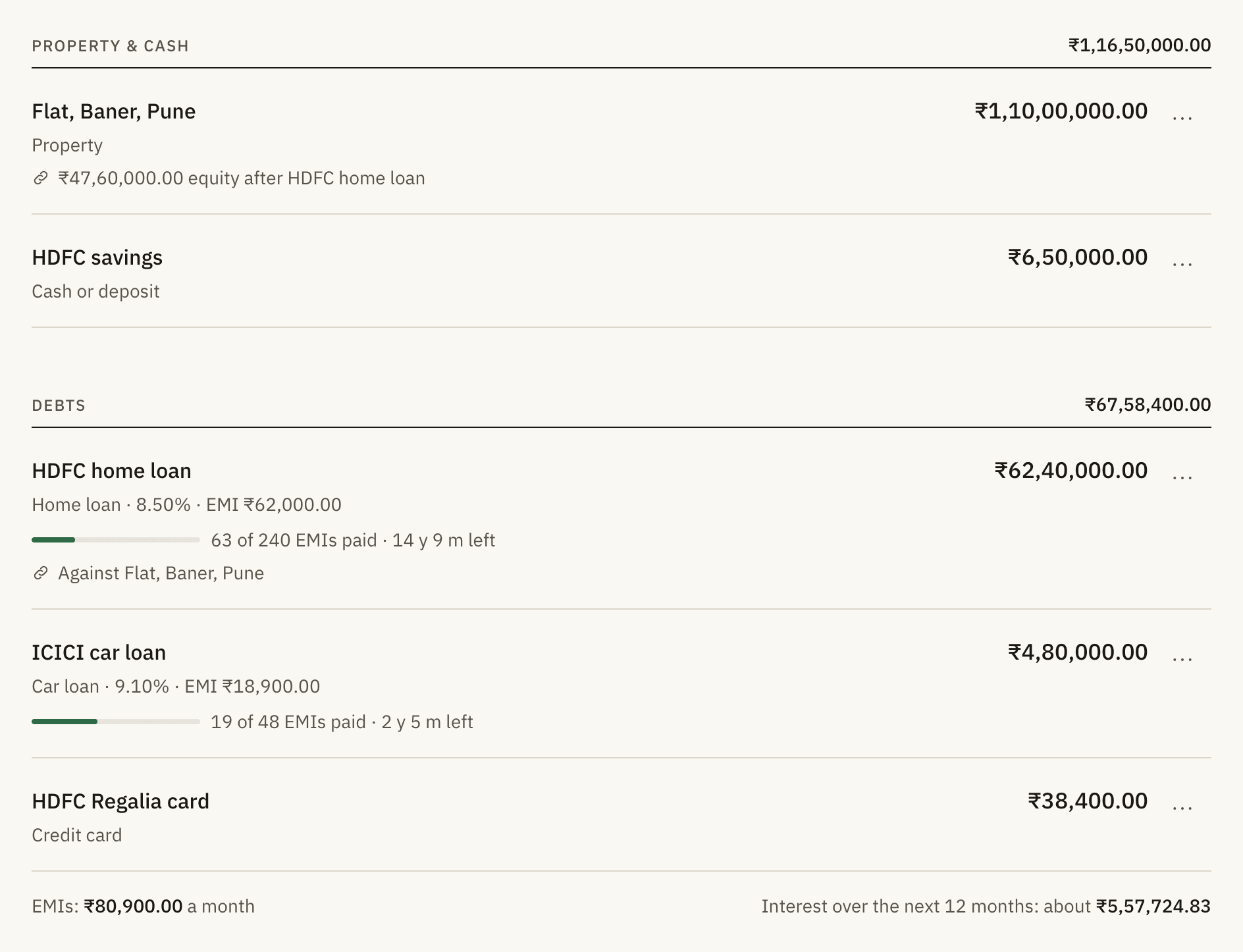
| Flat, Baner, Pune | Property | ₹1,10,00,000 |
| HDFC savings | Cash | ₹6,50,000 |
| HDFC home loan | Debt | −₹62,40,000 |
| ICICI car loan | Debt | −₹4,80,000 |
| Credit card statement | Debt | −₹38,400 |
| Net worth | ₹1,33,11,600 | |
They own ₹2,00,70,000 and owe ₹67,58,400, so their net worth is ₹1,33,11,600. The debts come to about a third of what they own, and Networth says that in plain words under the total.
A loan counts at what you owe today, not the EMIs left
This is the most common mistake. The home loan above has 177 EMIs of ₹62,000 left, which adds up to ₹1,09,74,000. But the bank would close the loan today for ₹62,40,000, the outstanding principal. The other ₹47 lakh is interest for years that haven't happened yet. If you repaid the loan tomorrow, you'd never owe it.
So Networth counts every loan at its outstanding balance: the “principal outstanding” on your loan statement or in your bank's app. For a credit card, use the balance on your latest statement. Even if you pay it in full every month, you owe it until you do.
Property: use a value you could actually sell for
Nobody publishes a live price for your flat, so you enter the value yourself. Use a careful figure: recent sale prices for similar flats nearby, not the asking prices on listing sites and not what you paid five years ago. Update it once or twice a year. A generous property value can make your net worth look lakhs higher than it really is.
Secured loans and equity
When you link a home loan to the flat it's secured against, Networth shows your equity in that flat: its value minus what you owe on it. In the example that's ₹1,10,00,000 − ₹62,40,000 = ₹47,60,000. Linking doesn't change the total, which already counts the flat and the loan separately. It just shows how much of the flat is really yours.
Debts in other currencies
A loan in Singapore dollars or a card billed in US dollars is converted at the live exchange rate, the same one used for your stocks, so a rupee total stays a rupee total. If a rate can't be fetched, that item is left out of the total and marked as excluded. It never guesses a rate or quietly assumes 1.
How loan progress is measured
If you enter total EMIs and EMIs left (both are on your loan statement), progress is counted in EMIs:
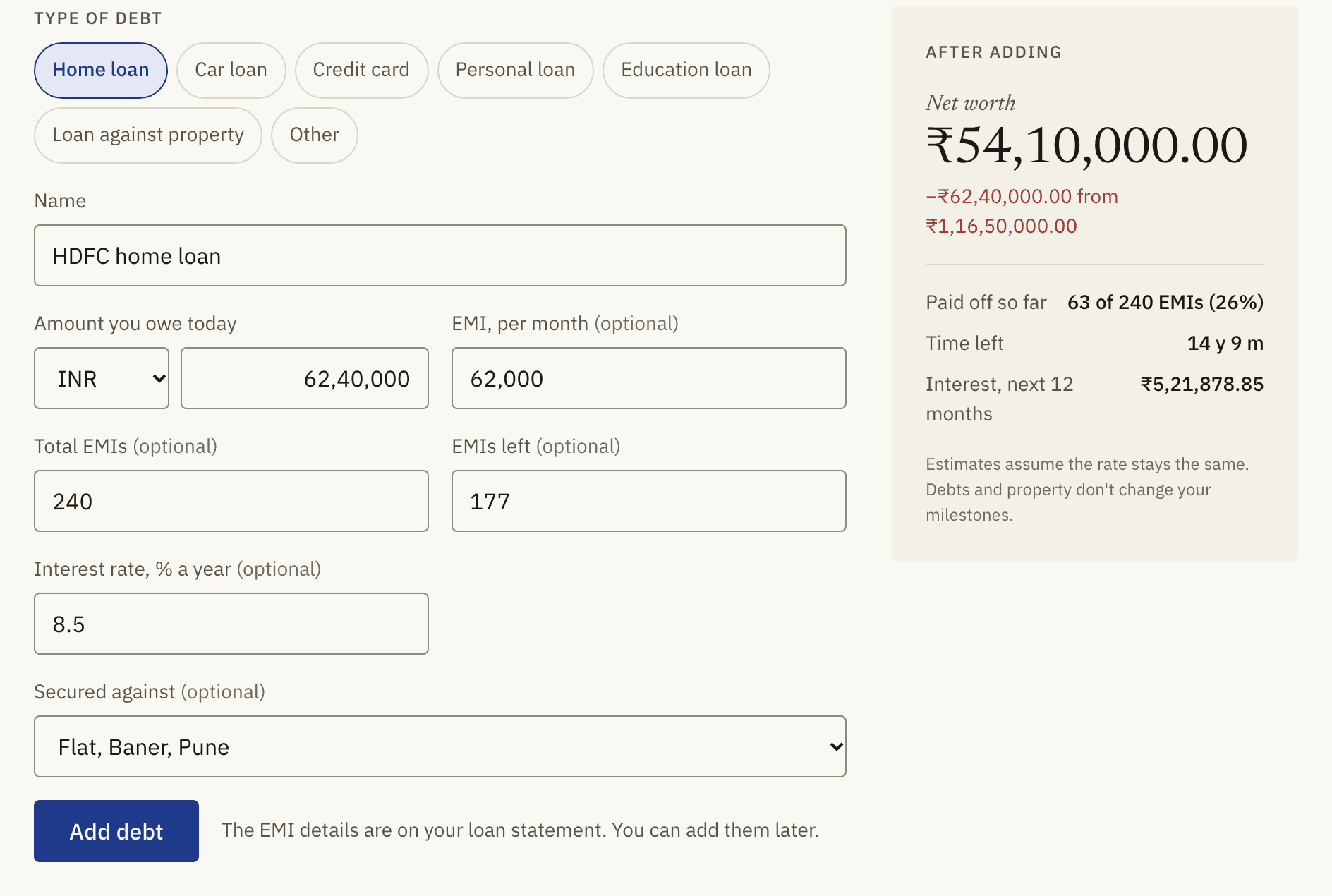
EMIs paid = total EMIs − EMIs left = 240 − 177 = 63 (26%)
Time left is simply the EMIs left, read as months: 177 months is 14 years and 9 months. You don't need to update the count every month. Networth subtracts one for each month that passes after you enter it.
One thing surprises most people. After paying 26% of the EMIs, you've repaid much less than 26% of the loan. If this loan began at about ₹71.4 lakh, the 63 EMIs paid so far have cleared only about 13% of it. Early EMIs go mostly to interest. This month, ₹44,200 of the ₹62,000 EMI is interest and only ₹17,800 reduces the balance.
If you leave the EMI counts blank but enter the rate and EMI, Networth estimates the time left from the standard amortisation formula, where r is the monthly rate (the yearly rate ÷ 12):
Months left = −ln(1 − r × balance ÷ EMI) ÷ ln(1 + r)
For ₹62,40,000 at 8.5% with a ₹62,000 EMI, that also gives 177 months. If the EMI doesn't even cover the monthly interest, the loan would never be repaid, and the form tells you so.
Interest over the next 12 months
With a rate and an EMI, Networth steps through the next 12 months the way your bank does. Each month it adds interest (balance × monthly rate), subtracts the EMI, and carries the new balance into the next month.
For the home loan that comes to about ₹5,21,900 of interest in a year. Of the ₹7,44,000 in EMIs, about 70% is interest. The car loan adds about ₹35,800, so the household will pay roughly ₹5.6 lakh in interest over the next year. Without an EMI, the estimate is simply balance × yearly rate.
What debts don't change
- Day change stays on investments, because loan balances don't move during the day. It's labelled “today, on investments”.
- Milestones track investments too, so adding a large home loan doesn't undo milestones you've already reached.
- The diversification score looks only at your stocks and ETFs.
- History is rebuilt from past market prices, so for now it covers investments only. Networth labels it that way.
Your goal is the exception. Goals like buying a home or financial independence only make sense against true net worth, so progress toward a goal uses the full number.
Keeping it honest
- Balances go out of date. A debt whose balance is more than 30 days old shows an “Update balance” reminder. Credit cards need this most.
- Estimates assume today's rate. Most home loans in India, and many in Singapore, have floating rates. When the rate changes, the bank usually changes either your EMI or the number of EMIs left. Update them from your next statement.
- Prepayments lower the balance and usually the EMIs left. Enter both after you make one.
- Your statement is the final word. Networth's figures are estimates for tracking, not a payoff quote. Ask your lender for the exact amount before you close a loan.
Privacy
Networth never connects to your bank or asks for a login. You type in each debt yourself: a name, the amount, its currency and, if you like, the rate, EMI and EMI counts. If you sign in, those are saved to your account like your holdings, and deleting your account erases them. The Privacy Policy has the details.
To try it, open Networth, choose the Debt tab above the search box and add your first loan. You don't need an account to see the result.